The free AI interview copilot only you can see.
Hintify hears the question and brings up your own stories as points to say, in seconds. Undetectable in screen shares.
The only free interview copilot with every feature included. Pro $19/month, cancel anytime.
ThemTell me about a time you disagreed with your manager.
✓ Heard on your device
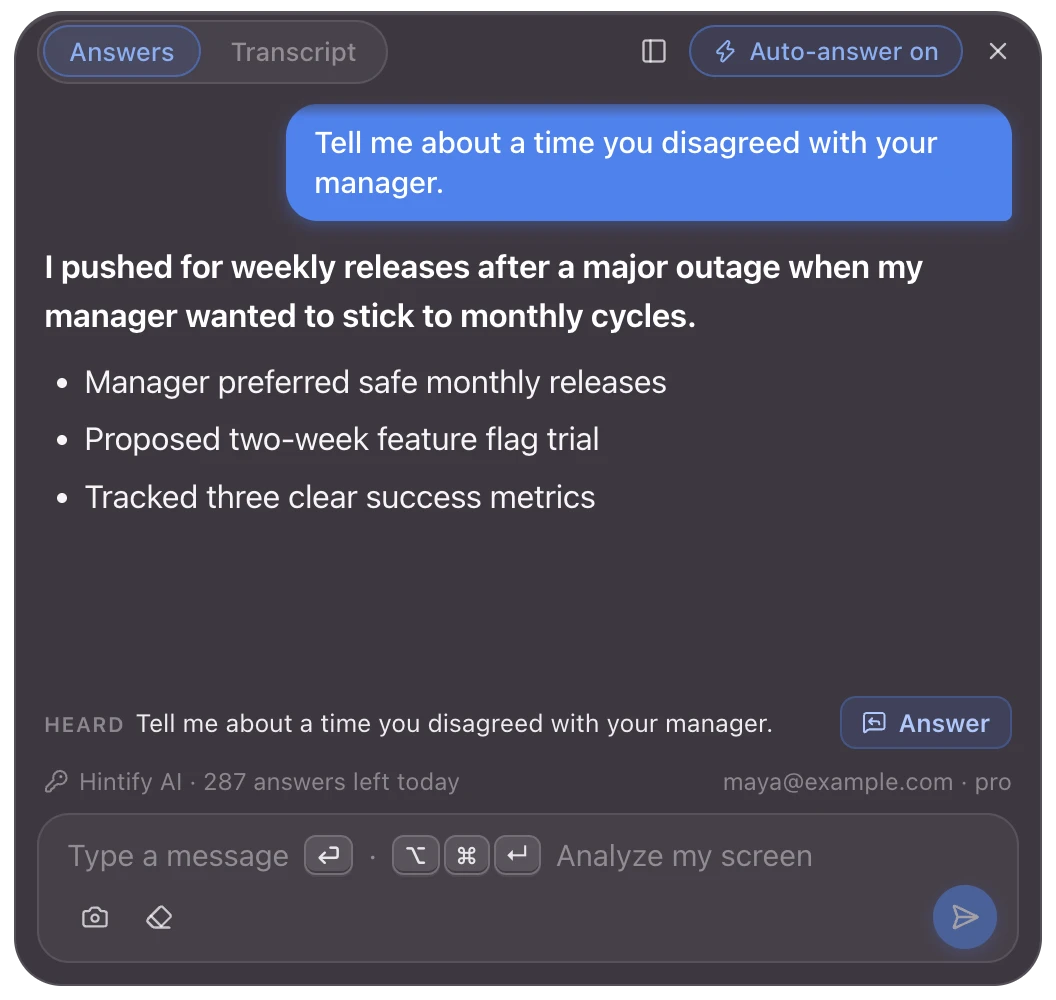
I pushed for weekly releases after a major outage when my manager wanted to stick to monthly cycles.
- • Manager preferred safe monthly releases
- • Proposed two-week feature flag trial
- • Tracked three clear success metrics
Answer built on
Weekly releases trial
Acme Cloud · 2024
Story
The analytics pilot that missed
Acme Cloud · 2023
Story
Billing migration across four teams
Acme Cloud · 2025
Works where you talk
Floats over
- Zoom
- Google Meet
- Microsoft Teams
- Slack
- Webex
- and any other call app
Undetectable
Undetectable in screen shares.
Share your screen and the interviewer sees the call. Your stories stay on your side of the glass.

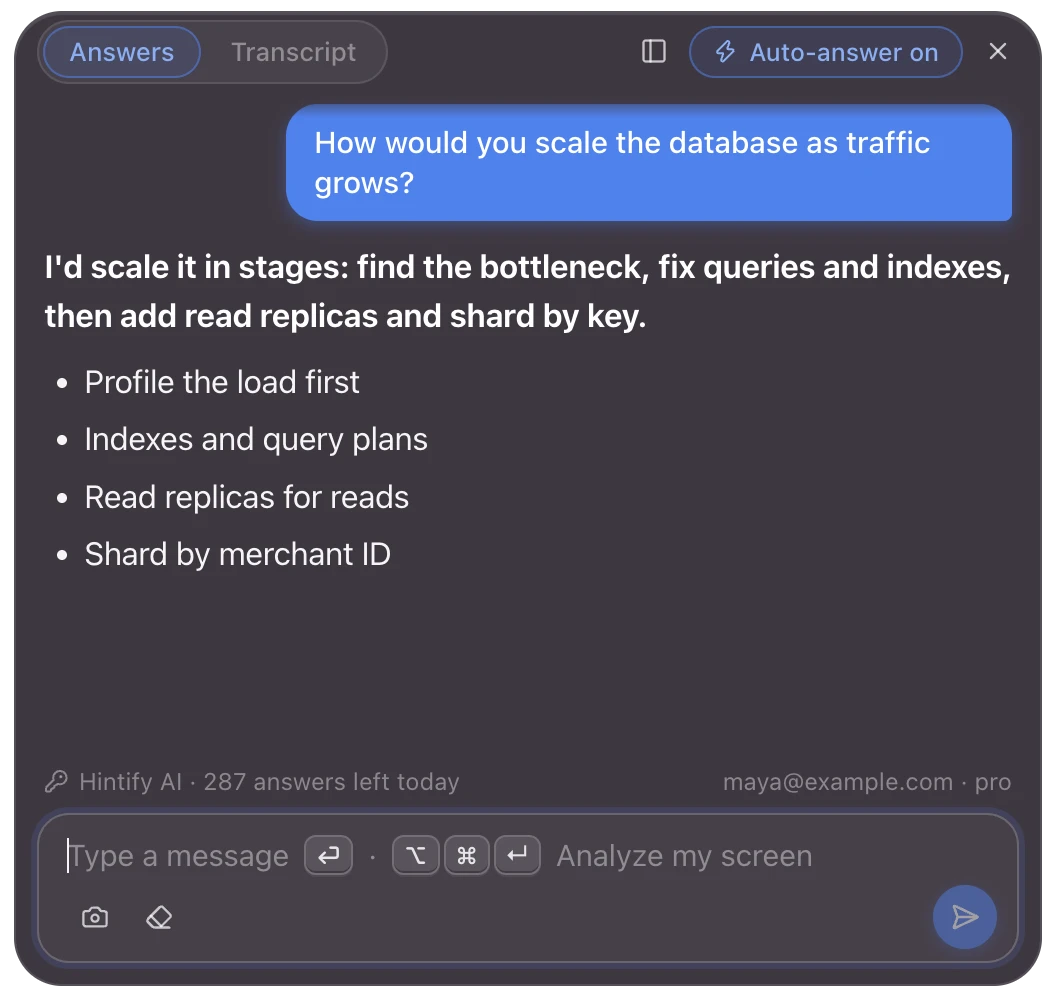
Drawn to show the idea: the overlay on the left is a real capture of the app; the call around it is illustrated.
They see your call, not your notes
Hintify asks macOS and Windows to keep its window out of screen shares, recordings and most capture tools. The table below shows where we've checked.
Nobody new in the room
There's no bot, no plugin and no extra name in the participant list. Hintify hears the call through your computer.
Your eyes stay near the camera
Park the panel under your webcam. It opens without grabbing the cursor, so you can keep typing in the call.
Tested with
Where we've checked it, and what happened. Some capture tools can still see protected windows, and Linux has no protection; see the FAQ, and do a test call before you rely on it.
macOS screenshot · recording
- macOS:
- ✓ HiddenmacOS 27.0.1
macOS screen recording · recording
- macOS:
- ✓ HiddenmacOS 27.0.1
Chromium screen capture · whole screen
- macOS:
- ✓ HiddenmacOS 27.0.1Chromium's screen-capture API (Electron desktopCapturer)
| Tested with | Sharing | macOS |
|---|---|---|
| macOS screenshot | recording | ✓ HiddenmacOS 27.0.1 |
| macOS screen recording | recording | ✓ HiddenmacOS 27.0.1 |
| Chromium screen capture | whole screen | ✓ HiddenmacOS 27.0.1Chromium's screen-capture API (Electron desktopCapturer) |
Still testing on macOS: Zoom, Google Meet (Chrome), Microsoft Teams, Webex, Slack huddles, QuickTime, OBS. Still testing on Windows: Zoom, Google Meet (Chrome), Microsoft Teams, Webex, Slack huddles, Snipping Tool recording, Game Bar, OBS.
Built for speed
Answers start while you're still nodding
From the moment they stop talking to the first word on your screen.
Transcribed on your computer
No audio upload, no queue.
Streams word by word
The first words land before the rest is written.
Your stories, preloaded
Nothing to search first: they travel with every question.
Short on purpose
An opener to say, then the beats. Less to read.
How we measure
Twenty interview questions spoken by seven synthetic voices in six English accents play into the real app as the other side of a call. The clock runs from the end of each question to the first word of the answer on screen, through the on-device transcript and Hintify's AI. We publish the median once it's three seconds or under.
How it works
From your stories to your answer
Fill it in once before your interviews. Every answer draws on it.
- 1
Add your stories
Your résumé, the job description and 3–5 stories. Import PDF or Word, or paste.
- 2
It hears the question
Hintify listens on your computer. Nothing joins the call.
- 3
Your story comes up
The story that fits, as an opener to say and its beats to hit.
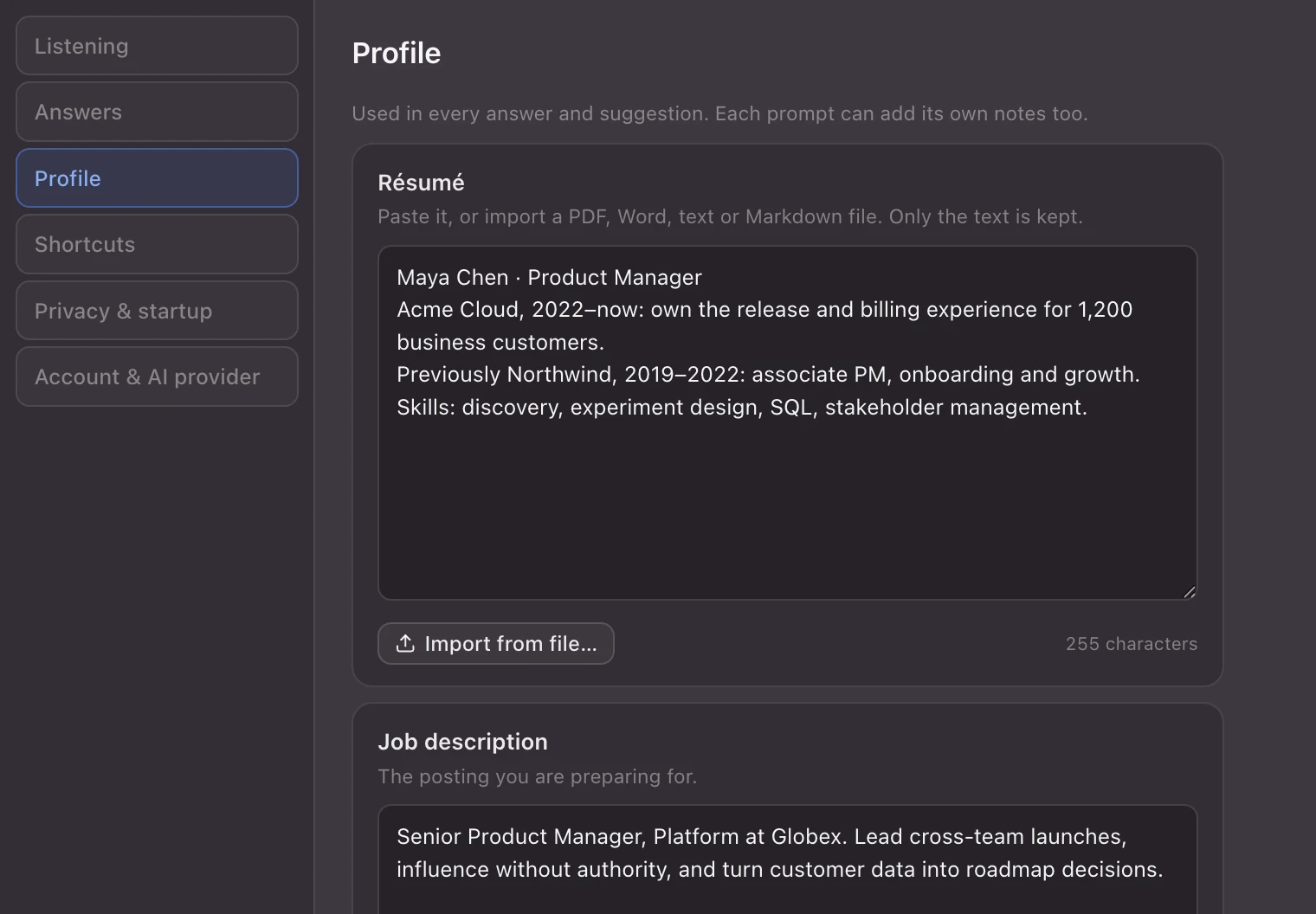
Your profile
Same question, two answers
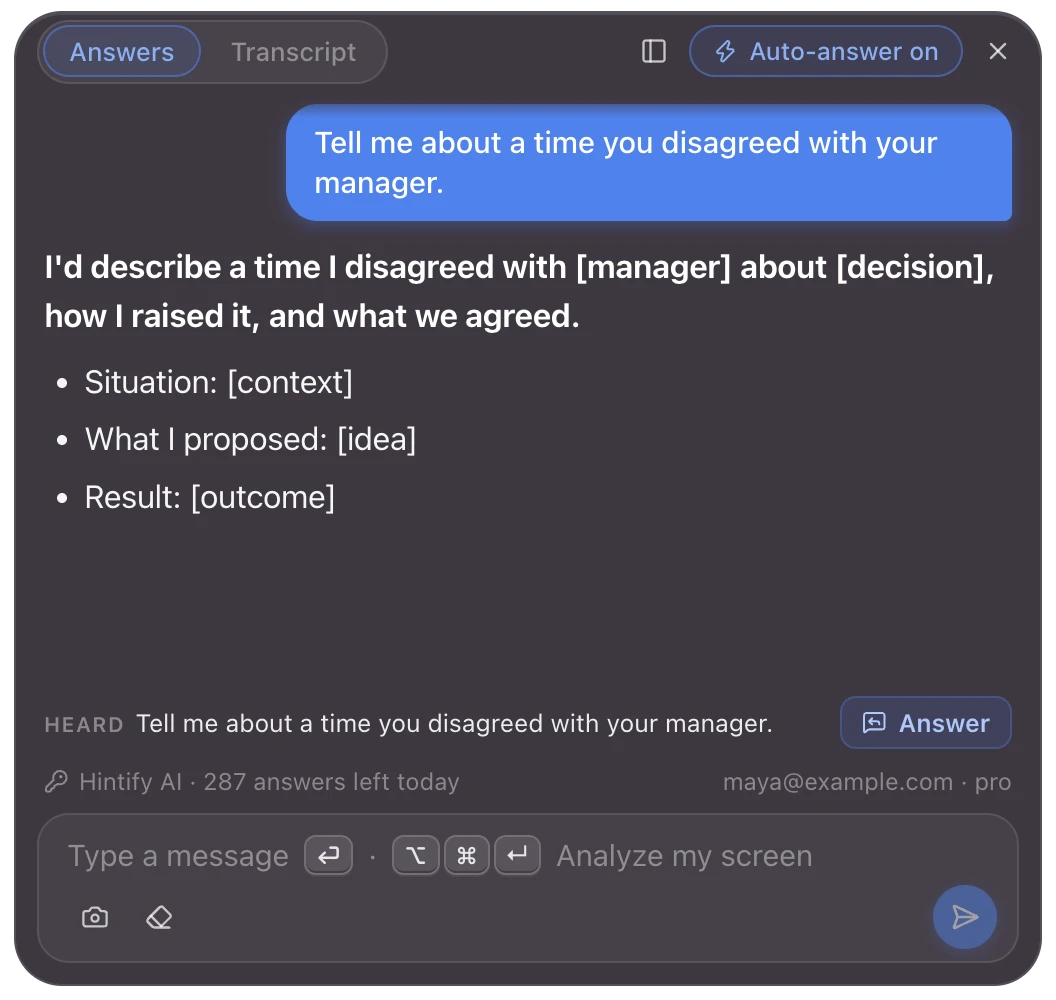
“Tell me about a time you disagreed with your manager.” Without your stories, Hintify leaves blanks to fill. With them, it tells your story.
Privacy
Private by design
What leaves your computer, and what never does.
Audio stays on your computer
An on-device model turns speech into text. Audio is never uploaded.
Text leaves only for answers and reviews
The question and recent transcript when you ask or hands-free answers; a finished session's transcript and your profile for its interview review, and again if you retry it or change its type. Screenshots only when you take one. We keep usage counts, not content.
Reviews saved locally
Interview reviews and meeting reports are stored on your computer, not on our servers.
No bot joins
Nothing is added to your meeting or its participant list.
Every detail is in the FAQ and on the Privacy page.
Also for
Also for meetings and calls
Sales calls, stand-ups, technical rounds, your second language.
Technical rounds
ThemHow would you design a URL shortener?
YouLet me start with the write path…
Answer: Base62 IDs from a counter, a key-value store, a cache for hot links, 301 redirects.
Sales calls
ThemWe already have a tool for this. Why switch?
YouFair question. Here's the short version…
Answer: Your data imports in a day, workflows stay the same, and there's no setup fee.
Team meetings
ThemCan someone recap where we landed on the roadmap?
YouYes, give me a second…
Answer: Billing v2 ships in July, the mobile redesign moves to Q4, hiring is reviewed in August.
Interviewing in a second language
ThemWhat made you want to move into platform work?
YouGood question, let me think…
Answer: Hear the question in English and read the answer in the language you choose, or in English to say.
Pricing at launch
Practice on Free. Upgrade for interview season.
Every plan is undetectable in screen shares, answers hands-free and keeps audio on your computer. These are the prices we launch with.
Free
Free
Every feature, with a daily Hintify AI allowance.
- Live transcript on your computer
- Hands-free: answers the moment they ask
- Suggested questions
- Interview reviews after the call
Hintify AI each day
- 60 answers a day
- 5 screen analyses a day
- 45 minutes of live suggestions a day
- 2 reports a day
- 1 computer
Pro
$19/mo
AI included for every working day. No key, no setup.
- Everything in Free
- Faster, sharper answers
Hintify AI each day
- 400 answers a day
- 60 screen analyses a day
- 5 hours of live suggestions a day
- 25 reports a day
- 2 computers
Unlimited
$39/mo
For full days of back-to-back calls.
- Everything in Pro
Hintify AI each day
- Unlimited answers (fair use)
- 250 screen analyses a day
- 10 hours of live suggestions a day
- 100 reports a day
- Cloud speech recognition (coming soon)
- 3 computers
- Cancel anytime from your account
- Charged by mistake? Refunded within 14 days
- Daily allowances reset at midnight UTC
Platforms
Launching soon on Mac and Windows.
It hears the call through your speakers and microphone, so Zoom, Meet, Teams or a browser call all work the same.
macOS
In beta- macOS 13 Ventura or newer
- Apple silicon or Intel
- Microphone and Screen & System Audio Recording permissions
Hidden from screen sharing by macOS content protection.
Windows
In beta- Windows 10 (version 2004 or later) or Windows 11
- 64-bit
- Installer or portable app
Hidden from capture by Windows display affinity.
Linux
Later- 64-bit, AppImage or .deb
- System audio through PulseAudio or PipeWire monitor devices
Linux has no capture protection: the overlay shows in screen shares.
FAQ
Straight answers
What people want to know before they bring Hintify into a call.
No, not in screen shares or recordings: the overlay asks macOS and Windows to leave it out, and no bot joins your call, so there's no extra participant. See the Tested-with table for the results we have. Some capture tools can still pick up protected windows, and Linux offers no protection at all, so do a test call with your own setup before you rely on it.
Not on screen. What they can notice is you: keep the panel near your camera, glance rather than read, and answer in your own words. Answers are short on purpose, an opener and a few beats, so you can look up and talk.
Answers start streaming a few seconds after they stop talking. The transcript is made on your computer, and the answer streams in word by word: an opener first, then the beats of your story. Measured in October 2026 on the Free plan.
Use it only where you're permitted to. Many interviews, exams and workplaces have their own rules about AI help, and those rules still apply to you. Hintify doesn't change them, and hiding the overlay from a share isn't a reason to ignore them.
Hintify transcribed accented English well in our tests, with seven voices covering US, UK, Indian, Australian, Irish and South African accents. That was 20 synthetic-voice questions, so test it with your own voice too. The spoken language and the answer language are set separately, so you can hear the question in English and read the answer in your language, or in English to say.
Hintify is in private beta now. Join the waitlist and we'll email your invite: we're letting people in in small batches ahead of launch.
Audio never leaves: an on-device model turns it into text. Text leaves in two cases. For answers, the question and recent transcript go out when you ask or press Answer, while hands-free is on, and while the suggested-questions rail is open. For reviews, a finished session's transcript and your saved profile (résumé, job description, stories) go out to write its meeting report or interview review, and again if you retry it or change its type; the result is stored on your computer. Both go to Hintify AI, and we keep only usage counts, never the content. A screenshot is taken only when you press the shortcut or the camera button.
No. Hintify AI is included on every plan, Free too, with a daily allowance. There's nothing to set up: sign in and ask.
Hintify AI, set up specifically for interviews: it turns the question, your résumé and your stories into an opener and a few beats you can say. It's included on every plan, and paid plans answer faster and in more depth.
The on-device transcript covers 28 languages, from English, Spanish and German to Japanese, Hindi and Arabic. The spoken language and the answer language are set separately, so you can pick the language you hear and, separately, the language your answers appear in.
Both. Hintify hears your microphone and your computer's audio, so the other side comes through whether you wear headphones or use speakers. Headphones give the cleanest split between You and Them. On a Mac, hearing the other side needs macOS 13 or newer and the Screen & System Audio Recording permission.
Any of them: Zoom, Google Meet, Microsoft Teams, Slack huddles, Webex, a browser call or a phone on speaker. Hintify hears the call through your computer's audio and microphone, so there is no plugin to install and nothing for the host to approve.
Yes. Free has every feature, with a daily allowance of Hintify AI. Pro ($19 a month or $190 a year) and Unlimited ($39 a month or $390 a year) raise the daily allowances, give faster and sharper answers and add computers. Hands-free answering is on every plan, Free included. There is no trial: Free is just free.
Paid plans are billed by Stripe. Cancel anytime from Manage billing on your account page: the plan stays active until the end of the period you've paid for, then you're back on Free and aren't charged again. Cancelling doesn't refund the period you're in. If you were charged by mistake, for example a renewal you meant to cancel, email support@hintify.app within 14 days of the charge and we'll refund it if you haven't used the paid plan since.
Yes, for Windows 10 (version 2004 or later) and Windows 11, 64-bit, as an installer or a portable app, with the overlay hidden from capture by Windows itself. Beta testers download it from their account page; it isn't code-signed yet, so Windows may warn you the first time (More info → Run anyway).
A notetaker joins as a bot or records the call, and its value arrives after you hang up. Hintify joins nothing: it runs on your computer, transcribes on the device, and puts the answer on your screen during the call, while the question is still in the air.
Walk into your next interview with your stories ready.
Join the beta for early access. Undetectable in screen shares. Audio stays on your computer.